
Agent Frontend Protocol
Esta página aún no está disponible en tu idioma.
Version 1.
The protocol connects a front end to the rumbo host. A front end is what a person uses: it sends objectives and shows what the agent does. The host owns the session, the tools, and the loop, and shows nothing itself.
The Go types are in the protocol package (frontend.go),
which also contains DialFrontend, a ready-made connection for front ends
written in Go, and DialFrontendConfigured for one with a start
configuration, which answers with the configuration in force. examples/frontend.py is a front end
in Python.
Transport
Section titled “Transport”Messages are JSON-RPC 2.0 objects, one per line, UTF-8. There are two ways to be connected, with the same messages on both:
| Who starts whom | The front end reads from | The front end writes to |
|---|---|---|
rumbo starts a registered front end |
file descriptor 3 | file descriptor 4 |
The front end starts rumbo serve |
the host’s stdout | the host’s stdin |
A registered front end keeps stdin, stdout, and stderr connected to the
terminal, so it can draw and read keys freely. A front end that starts
rumbo serve passes it the same flags as rumbo (-c, -s, -m,
-single) and sets its working directory to the project.
Closing the connection ends the host: it cancels the runs in progress, stops
the providers, and exits. SIGTERM and SIGHUP end it the same way, and close
the connection. The exit code of a registered front end becomes the exit
code of rumbo, unless a signal ended the host.
Requests are handled in the order they arrive. What reaches a provider is
answered when it is done, without holding up what comes after it: a run
is accepted in order and answered when it ends, and describe, the
provider’s functions, and the host’s compact and provider-show are answered
when the provider has. A history, a recall, and the host’s other
functions are answered at once, before the request after it. A front end that needs one of those to take effect
before another request waits for its answer.
Sessions
Section titled “Sessions”A host works in the sessions of one project. One of them is the current
session: the one initialize names, the one a run goes to when it names
none, and the one the host’s functions act on by default. A run can also
name another session of the project, or ask for a new one; each session has
one run at a time, and several sessions can work at once.
Started with -single, the host works in one session at a time: runs go
only to the current session, and changing session waits for the run in
progress to end.
Lifecycle
Section titled “Lifecycle”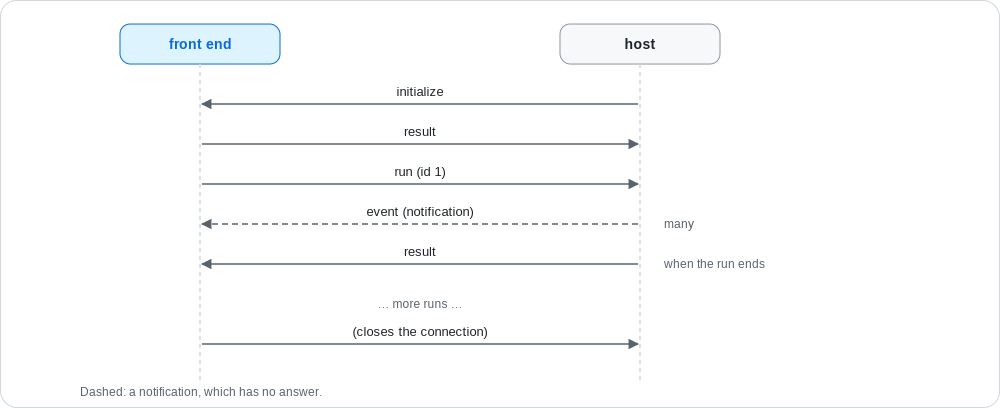
Methods
Section titled “Methods”initialize (request, host to front end)
Section titled “initialize (request, host to front end)”The host speaks first.
{ "jsonrpc": "2.0", "id": 1, "method": "initialize", "params": { "protocol": 1, "dir": "/home/me/project", "session": "4cf0261c", "provider": "anthropic", "model": "claude-opus-5-5", "objective": "fix the failing test", "config": {} }}sessionis the current session, absent when it is a new one; the firstrunthat works in it carries its id in its events and its result.modelis empty when nothing chose one yet: a provider has no model set for it, and the command line gave none. A run is refused until one is chosen, withuseor with the run’s ownmodel.objectiveis what the user already wrote on the command line, if anything. A front end is expected to run it without asking again.resumeistruewhen the user asked to continue the session’s unfinished run (rumbo -r). A front end is expected to send arunwithresume.configis what the user chose for the front end (rumbo frontend config, or itsconfigin rumbo’sconfig.yaml), as JSON. Its meaning is the front end’s own.functionsare what the host itself can be asked, whatever the provider. See Functions of the host.
Result: {"protocol":1,"name":"my-frontend","config":{}}.
config in the result is the start configuration in force: the one given,
with the front end’s own default for every field it was not given. The host
stores none of it: only what the user chose is kept.
run (request, front end to host)
Section titled “run (request, front end to host)”{ "jsonrpc": "2.0", "id": 1, "method": "run", "params": { "objective": "add a --json flag" } }Starts a run on objective. Instead of an objective, {"resume": true}
continues the session’s last run where it stopped: one that failed, was
cancelled, or was cut short by the host dying. It is an error when the last
run finished.
images are pictures the person gave with the objective, such as one
pasted: a list of {"media_type": "image/png", "data": "<base64>"}, as in a
tool’s result (see protocol.md). They go to
the model with the objective, and come back with the summary when the
conversation is compacted. A run of images alone, with no objective, is
taken too. The host prepares each one for the model, made smaller when it
is large, and refuses the run when one is not a PNG, JPEG, GIF, or WebP
image.
Where it runs is the current session, unless the request says otherwise:
session names another session of the project, and "new": true starts a
new one, which keeps the provider of the current session. Neither changes
the current session. A run in a session that is already working is refused
with a JSON-RPC error, as is one in another session under -single.
Two optional fields choose, for this run, among what the provider offers:
model, and options, an object of option values. What is left out keeps
the value in force in the session, which describe reports for the current
one. A run in a session without a model, and with none of its own, is
refused.
The result arrives when the run is over, however it ends:
{ "status": "done", "session": "4cf0261c" }status |
Meaning |
|---|---|
done |
The model finished the task. |
failed |
The run ended with a problem; error explains it. |
cancelled |
The front end cancelled it. |
Other requests can be sent while runs work, without waiting for their
results; each answer carries the id of its request. A run is named by the id
of its run request in its events, in cancel, and in steer, so a front
end should not reuse the id of a run in progress.
describe (request, front end to host)
Section titled “describe (request, front end to host)”{ "jsonrpc": "2.0", "id": 2, "method": "describe" }Asks what the provider of the current session offers and what is in force there. It is how a front end shows a model picker or a settings form for a provider it knows nothing about.
{ "provider": "anthropic", "model": "claude-opus-5-5", "options": { "effort": "high" }, "offers": { "model": { "type": "string", "values": "models" }, "options": [{ "name": "effort", "type": "string", "enum": ["low", "medium", "high"] }], "functions": [{ "name": "models", "description": "List the models this account can use" }] }}modelandoptionsare what a run in the current session uses unless it says otherwise: the session’s model, and the values the provider’s configuration gives its options, with those chosen in the session over them.usechanges the model for the session, andsession-setthe options.offersis the provider’s own description, passed on unchanged. Its format is specified in the provider protocol. Any part of it may be absent.
The first describe starts the provider, so it can fail for the same reasons
a first run can.
history (request, front end to host)
Section titled “history (request, front end to host)”{ "jsonrpc": "2.0", "id": 4, "method": "history", "params": { "session": "4cf0261c" } }Asks what a session holds: the current session’s without session, or
another of the project’s. The answer tells it in events, oldest first, the
same events its runs sent while they worked, so a front end can show a
session it opens as if it had followed every run:
{ "session": "4cf0261c", "events": [ { "type": "objective", "session": "4cf0261c", "text": "fix the failing test" }, { "type": "text", "session": "4cf0261c", "text": "Let me look" }, { "type": "turn", "session": "4cf0261c", "usage": { "input": 900, "output": 40 }, "context": 940 }, { "type": "ended", "session": "4cf0261c", "status": "done" } ]}The events name no run, since run ids belong to the connection that sent
them. Three types appear only here, for what a front end otherwise knows of
the runs it follows itself: objective, steer, and ended. Text comes
whole rather than in pieces, a tool call is told when its result is, and
one that never got a result is told as started. A new current session
holds nothing yet: its session is absent and events is empty.
A history asked for before a run is answered before the run starts, so
none of the run’s events are missing from it or told twice.
recall (request, front end to host)
Section titled “recall (request, front end to host)”{ "jsonrpc": "2.0", "id": 5, "method": "recall", "params": {} }Asks what the person asked in the project’s sessions, so a front end can bring it back to its input. The answer holds the objectives and what was said to runs while they worked, most recent first, each text once, up to the last thousand:
{ "asked": ["and its tests", "fix the failing test"] }It comes from the sessions themselves: what a deleted session held is gone from it too, and the answers to a provider’s questions, which are never recorded, are never in it. A host without it answers that the method is not found, and a front end goes on without.
invoke (request, front end to host)
Section titled “invoke (request, front end to host)”{ "jsonrpc": "2.0", "id": 3, "method": "invoke", "params": { "name": "models" } }Calls a function the provider of the current session described, with
params if it takes any. The host relays the call and the answer without
reading either. A function that
an option names in values answers with {"values": [{"value", "label", "description"}]}; any other answers with JSON of its own.
A front end that lists the values of a parameter calls the function its
values names with what was given for the parameters before it, those the
function takes, so what it lists can depend on them: after the provider
of use, the models of that provider.
With "target": "host" the call goes to a function of the host instead; see
Functions of the host.
Runs do not keep describe and invoke waiting: a provider answers one
request at a time, so the host starts another process of it when every one
it has is busy.
A provider’s function can talk with the person while it works, as a login
does. What it says arrives as text events whose invoke is the id of this
request, and what it asks as an ask.
It takes as long as the person does; cancel with its invoke gives it
up.
ask (request, host to front end)
Section titled “ask (request, host to front end)”{ "jsonrpc": "2.0", "id": 2, "method": "ask", "params": { "invoke": 3, "text": "Paste the code the page shows", "secret": true }}A question for the person, from the function of the invoke request invoke.
The front end shows it and answers with what the person typed:
{ "jsonrpc": "2.0", "id": 2, "result": { "text": "4711-0815" } }or with an error when the person declines. With secret the answer, such as
a password, is not shown while it is typed, nor kept afterwards. A front end
that is not following that invoke answers with an error. The host does not
record questions or answers.
cancel (notification, front end to host)
Section titled “cancel (notification, front end to host)”{ "jsonrpc": "2.0", "method": "cancel", "params": { "run": 7 } }Stops the run whose run request had the id run; without it, every run in
progress. Each run request is still answered, with the cancelled status.
The sessions stay usable.
With invoke instead, it gives up a function in progress, named by the id
of its invoke request, which then answers with an error.
steer (request, front end to host)
Section titled “steer (request, front end to host)”{ "jsonrpc": "2.0", "id": 9, "method": "steer", "params": { "run": 7, "text": "use the v2 endpoint instead" }}Tells a run something while it works: the run whose request had the id
run, or without it the only run in progress. The text reaches the model
before its next request, as the user’s words, and the run’s objective stays
as it was. If the model was about to finish, the run goes on so the model
reads it. images go with the text, or alone, as they do with run.
The result, {}, arrives once the text is recorded for the model. An error
means it never will be: the run is not in progress, several are and none was
named, or the run ended first. A front end can offer the text as a new run
then.
event (notification, host to front end)
Section titled “event (notification, host to front end)”{ "jsonrpc": "2.0", "method": "event", "params": { "type": "text", "run": 7, "session": "4cf0261c", "text": "Let me look" }}What is happening in a run. run is the id of its run request and
session the session it works in, which tells a front end the id of a new
session from the run’s first event. A provider’s diagnostics belong to no
run and carry neither; the work of compact carries only session. type
selects the other fields:
type |
Fields | Meaning |
|---|---|---|
context |
sections |
Ambient context sent to the model, by section name. |
text |
text |
A piece of the model’s visible answer, in order. With invoke instead of run, something a provider’s function says while it works. |
tool_started |
name, args |
The agent calls a tool. |
tool_finished |
name, result, failed |
The call ended; result is what the model receives. |
turn |
usage, context, window |
One model response finished. usage is what it cost; context is how many tokens the conversation takes now; window is how many the model holds, when the provider said. |
log |
text, source |
A diagnostic. source is provider for the provider’s own output and host for what the host has to say, such as a request it retried or one that missed the provider’s cache. |
objective |
text, images |
The objective a run was given, and the images given with it. Only in a history. |
steer |
text, images |
What the person told a run while it worked. Only in a history. |
ended |
status, text |
How a run ended, with the status of a run result, and text saying why a failed run failed. Only in a history. |
A front end ignores event types and fields it does not know. New ones may be added without a new protocol version.
Functions of the host
Section titled “Functions of the host”Some things a person wants from any front end have nothing to do with the provider: changing session, changing provider, seeing what a conversation has cost, quitting. The host offers them as functions, described the same way a provider describes its own, so a front end can turn them into commands, menu entries, or buttons without knowing them beforehand. A host that gains a function gives every front end a new command.
They arrive in initialize, as functions, each with a name, a
description, params, and a group. A parameter marked optional may be
left out; the table below shows those with a ?. A function with a
confirm text cannot be undone: a front end shows that text and calls the
function only after the person agrees. A function marked lists is there
to list the values a parameter of another function takes, the one that
names it in values: a front end calls it for that parameter’s values, and
need not offer it as a command of its own. They are called with invoke
and "target": "host":
{ "jsonrpc": "2.0", "id": 5, "method": "invoke", "params": { "target": "host", "name": "use", "params": { "provider": "openai", "model": "gpt-x" } }}Parameters are an object of text values. Every answer has the same shape:
{ "text": "using openai/gpt-x", "values": [], "state": { "dir": "/home/me/project", "session": "4cf0261c", "provider": "openai", "model": "gpt-x" }}textis the outcome in words, for a person.valuesis set by a function that lists something, in the shape a provider’s value functions use:value,label,description.stateis what the front end is attached to after the call. A function may have changed it, so a front end takes its session, provider, and model from here instead of remembering them.
group says what a function acts on, so a front end can list them apart:
system: rumbo itself, the same for every session and provider. What a session chooses for itself wins over its settings there.session: one session of the project, the current one unless another is named.provider: the providers, how each is started, and what is set for each: the model a new session starts with, and its configuration, which holds the option values it gets with every request.
A front end should not take a group it does not know for an error; more may be added.
The functions of this version, by group:
| Function | Group | Parameters | What it does |
|---|---|---|---|
config |
system | Shows what is chosen and what applies, the current session’s choice first, then the system settings, the providers, and the front ends, each value with where it comes from: the session, config.yaml, rumbo’s default, or how rumbo has a built-in program. It starts nothing, so a program’s own defaults are not in it. |
|
system-set |
system | change |
Changes a system setting, as name=value; an empty value gives it back to its default. It is checked first, and applies to the runs that start after it; default_provider and frontend from the next start. |
system-values |
system | Lists the changes system-set takes. Marked lists. |
|
quit |
system | Stops the providers and ends the host, which closes the connection. Runs in progress are cancelled. | |
status |
session | session? |
The session, the model, the size of the context, what was spent, and how much of the input came from the provider’s cache. |
skills |
session | Lists the skills the model is told of in the current session’s directory, and those left out, with why. | |
sessions |
session | project? |
Lists the project’s sessions, most recently used first, with how each one stands: how its last run ended, or that it works in this host or in another rumbo process, and its turns; with a project, by its root, that project’s instead. |
projects |
session | Lists the projects that have sessions, by their root, most recently used first, with how many each has, and marks this host’s. A front end shows every project’s sessions with them, and starts rumbo serve in the root of the one a person opens. |
|
open |
session | session |
Makes another session of the project the current one. |
new |
session | Makes the next task start a new session. | |
branch |
session | point? |
Makes a branch of the current session the current one: a new session with a copy of it, as it is, or as it was before the person’s message numbered point. The session it came from stays as it is, and goes on working when it was; the files stay as they are. Without point, it waits for a run working in the session. |
branch-points |
session | Lists the person’s messages in the current session, by number, which a branch can start before. Marked lists. |
|
delete |
session | session |
Deletes a session of the project and its history, for good. Asks to be confirmed. |
rename |
session | title |
Gives the current session a title of the person’s own. |
prune |
session | age, confirm? |
Lists the project’s sessions not used in that long, such as 30d; with confirm as yes, deletes them, for good, with their history. Those in use are kept. |
use |
session | provider, model |
Changes the provider and the model of the current session for the tasks that follow. The session goes on, and keeps them. Options chosen in it for another provider are dropped. |
session-set |
session | change |
Chooses, as name=value, a value of one of the provider’s options for the current session, which keeps it over the provider’s configuration; an empty value gives it back. The provider is asked what it describes, and an option it does not describe, or a value it does not take, is refused. |
session-values |
session | Lists the changes session-set takes: the values of the current provider’s options, those in force marked. Marked lists. |
|
compact |
session | session? |
Replaces the conversation with a summary now. |
providers |
provider | Lists the providers there are: the built-in ones and those registered. | |
provider-models |
provider | provider? |
Lists the models a provider offers, asking it; without a provider, the current session’s, with the one it uses marked. The model of use lists its values with it. |
provider-show |
provider | provider? |
Starts a provider and shows each of its settings, its model, the fields of its configuration, and its options, with the value that applies and where it comes from, its own defaults included, and what it offers. Without a provider, the current session’s, with what the session chose over the rest. Also the test that it works. |
provider-set |
provider | provider, change |
Sets, as name=value, a provider’s model, a field of its configuration, or one of its options; an empty value gives it back to its default. The provider is started to check it: a name it does not describe, a value of another type or not among those it lists, and a configuration it does not start with are refused, and nothing is kept. |
provider-values |
provider | provider |
Lists the changes provider-set takes for a provider: its models, and the values of its fields and options. Marked lists. |
provider-add |
provider | name, command |
Registers a provider. The command is the program and its arguments, separated by spaces. The provider is started, which is the test that it works; one that does not start is not registered. |
provider-rm |
provider | provider |
Removes a provider the user registered, or what they chose for a built-in one, which stays. Asks to be confirmed. |
A front end should read the list from initialize and not from this table:
the table is what the host offers today.
A function waits only for the session it changes: delete and compact
answer with an error while something works in their session. open and
new change the current session while a run goes on in the one left
behind, and use changes the provider for the session’s next runs, while a
run in progress keeps the one it started with.
Under -single, what changes the session or the provider waits for the run
in progress instead, and answers with an error saying so: everything but
config, system-set, system-values, quit, status, skills,
sessions, projects, branch-points, rename, session-values,
providers, provider-models, provider-show, provider-values,
provider-add, and provider-rm.
What the host guarantees
Section titled “What the host guarantees”- It never uses the terminal. Everything the user should see is an event or a result. A front end can own the screen completely.
- It never acts on the terminal’s interrupt. Ctrl-C is the front end’s to
interpret;
cancelis how to stop a run. - Everything is recorded. The session is stored by the host as it happens, so a front end keeps no state it would need to restore.